Every marketer knows the frustration: you drive qualified traffic to your site, visitors engage with your content, and then they reach your lead capture form and leave. In field experiments with more than 16,000 participants, conversational capture produced more leads, of higher quality, than static pages (Journal of Business Research, 2025). The problem isn’t your offer. It’s the format.
Conversational lead capture changes how you collect prospect information. Instead of a wall of fields and a submit button, a guided conversation asks one question at a time, adapts to the answers, and feels like talking to someone who knows the business rather than filling out paperwork.
This guide covers everything you need to know to implement conversational lead capture, from the psychology behind why it works, to practical implementation strategies, to advanced optimization techniques that separate high-performing flows from mediocre ones.
What Is Conversational Lead Capture?
Conversational lead capture replaces traditional static forms with interactive, multi-step dialogue flows. Rather than showing all fields at once, information is collected one question at a time through a guided conversation that adapts based on the visitor’s responses.
Think of it as the difference between handing someone a clipboard with a form and having a conversation with them. The information gathered is the same, but the experience is fundamentally different.
How It Differs from Chatbots and Live Chat
It’s important to distinguish conversational lead capture from chatbots and live chat:
- Live Chat requires real-time human operators and is reactive. Visitors initiate the conversation
- AI Chatbots use natural language processing to handle freeform questions, requiring significant training data and ongoing management
- Conversational Lead Capture Flows are pre-built conversation trees with conditional logic. They follow designed paths that guide visitors toward specific outcomes without requiring AI or live agents
Conversational flows are deterministic by design. You control exactly what questions are asked, in what order, and what happens based on each response. This makes them predictable, measurable, and optimizable in ways that AI chatbots aren’t.
Why Conversational Forms Outperform Static Forms
The Psychology of Progressive Disclosure
Static forms trigger what psychologists call cognitive overload. When a visitor sees 8-12 fields at once, the perceived effort spikes and the natural response is to disengage. Research in behavioral psychology shows that breaking a large task into smaller, sequential steps dramatically increases completion rates, a principle known as progressive disclosure.
Conversational flows leverage this principle naturally. Each step presents only one question, making the perceived effort minimal at every point. By the time a visitor has answered 3-4 questions, the commitment and consistency principle kicks in. Having already invested effort, they’re psychologically motivated to complete the interaction.
Key Performance Metrics
Where conversational lead capture earns its keep:
- Completion: one question at a time keeps people moving instead of confronting a wall of fields
- Data Quality: higher quality responses due to guided input validation
- Lead Qualification: built-in qualification through conditional branching
- Speed to Lead: the average company takes 42 hours to respond to a new web lead (Harvard Business Review, 2011); a conversation that books a time window on the spot removes the wait entirely
- Mobile Performance: significantly better on mobile devices where form-filling is painful
Form vs. Conversation, Side by Side
| The static form | The conversation |
|---|---|
| Twelve fields at once | One question at a time |
| Same fields for every visitor | Branches based on the answers |
| “We’ll get back to you” | A booked day and time window |
| Name and email, no context | What they need, whether they fit, when to reach them |
| No idea which ad sent them | The campaign and click attached to the lead |
| Abandoned means invisible | You see the exact step where people stop |
The Mobile Factor
Most web traffic now comes from phones, where static forms are particularly painful. Small screens make multi-field forms feel claustrophobic, auto-fill often misfires, and fat-finger errors are common.
Conversational flows are inherently mobile-friendly. One question at a time, large touch targets, and a chat-like interface that mobile users are already comfortable with from messaging apps.
What This Looks Like in Practice
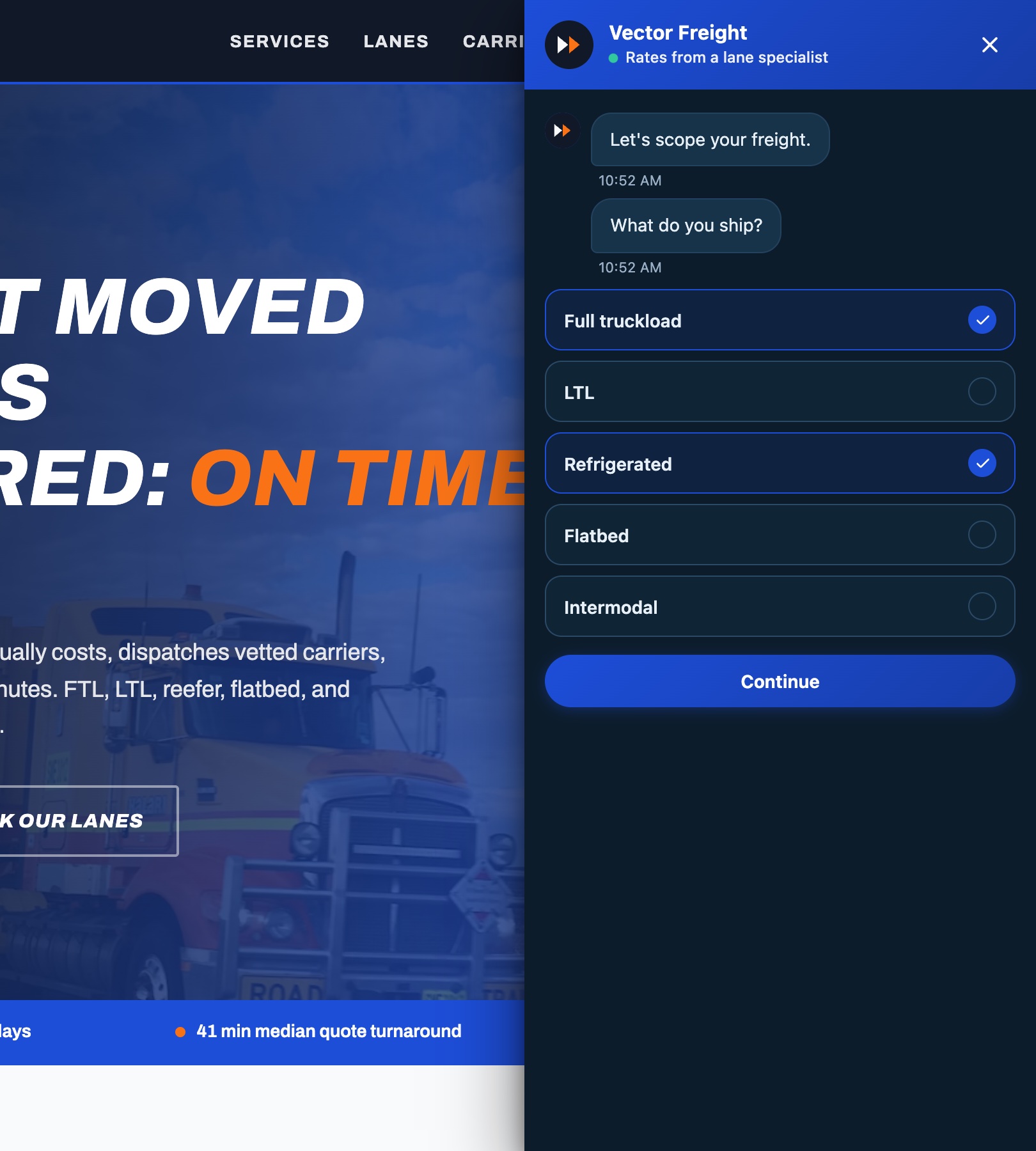
A homeowner’s furnace dies on a January night. At 9:47pm they are on their phone comparing three HVAC companies. Two of them offer a contact form: a dozen fields and a promise to reply within one business day. The third greets them with a conversation: what broke, where are you, when can we come. Three questions later the job is dispatch-ready, and the homeowner picked Thursday morning themselves.
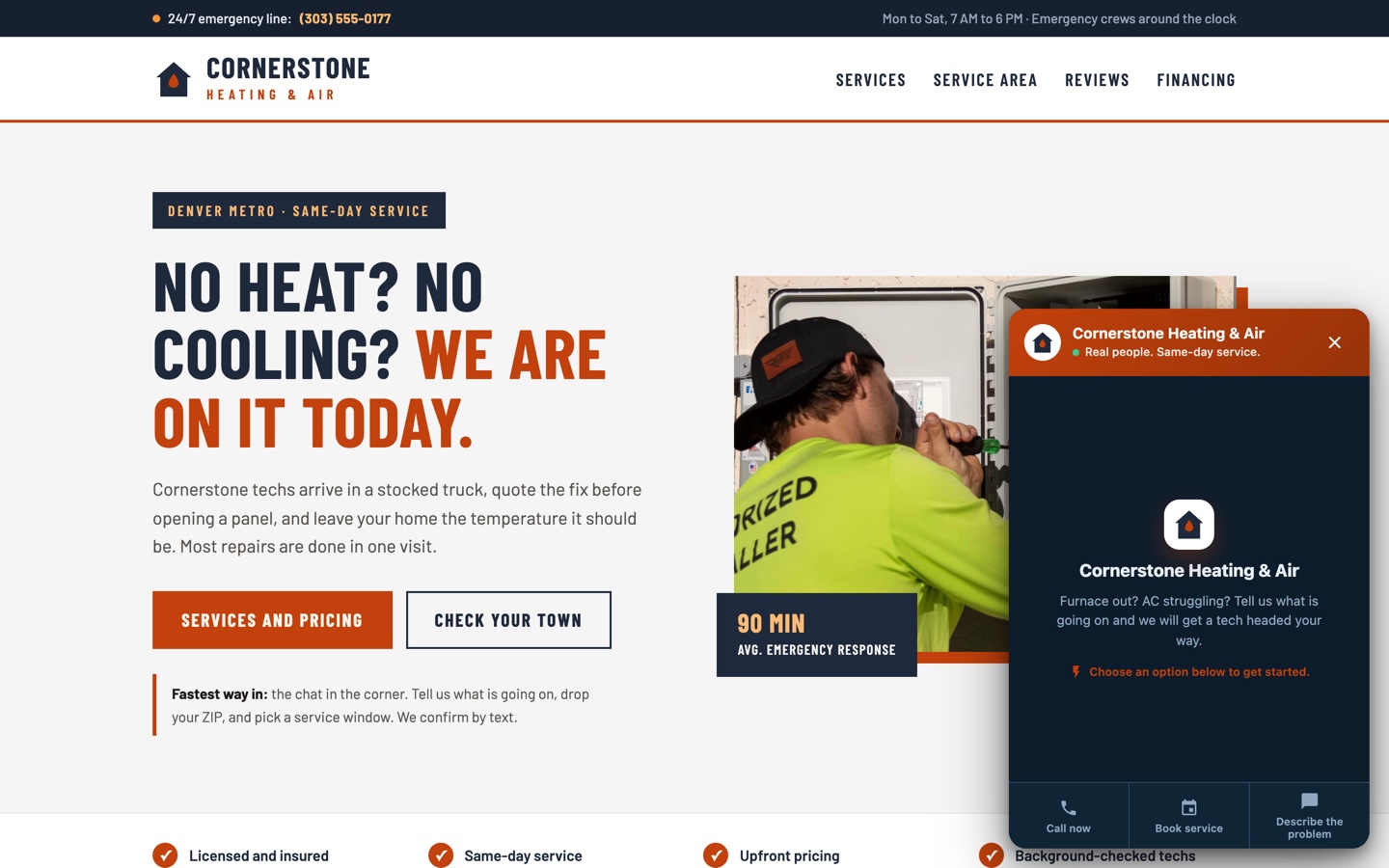 An example build for a fictional HVAC company. The chat bubble takes a service call in three questions.
You can walk through that exact flow yourself on the live example build: Cornerstone Heating & Air. It is a real page running a real magnet; finish the conversation and you will see everything this guide describes in about a minute.
Building Your First Conversational Flow
Step 1: Define Your Objective
Before building anything, clearly define what you want to accomplish:
- Lead Qualification: Determine if a visitor is a good fit before routing to sales
- Appointment Booking: Let your visitor pick a day and time window inside the conversation, so “Thursday morning” arrives with the lead
- Demo Scheduling: Guide visitors to book a demonstration
- Content Delivery: Qualify interests before delivering targeted resources
- Product Recommendation: Help visitors find the right product or service
- Newsletter Signup: Convert readers into subscribers with personalized content paths
Each objective demands a different flow structure, question sequence, and call-to-action.
Step 2: Map Your Conversation Logic
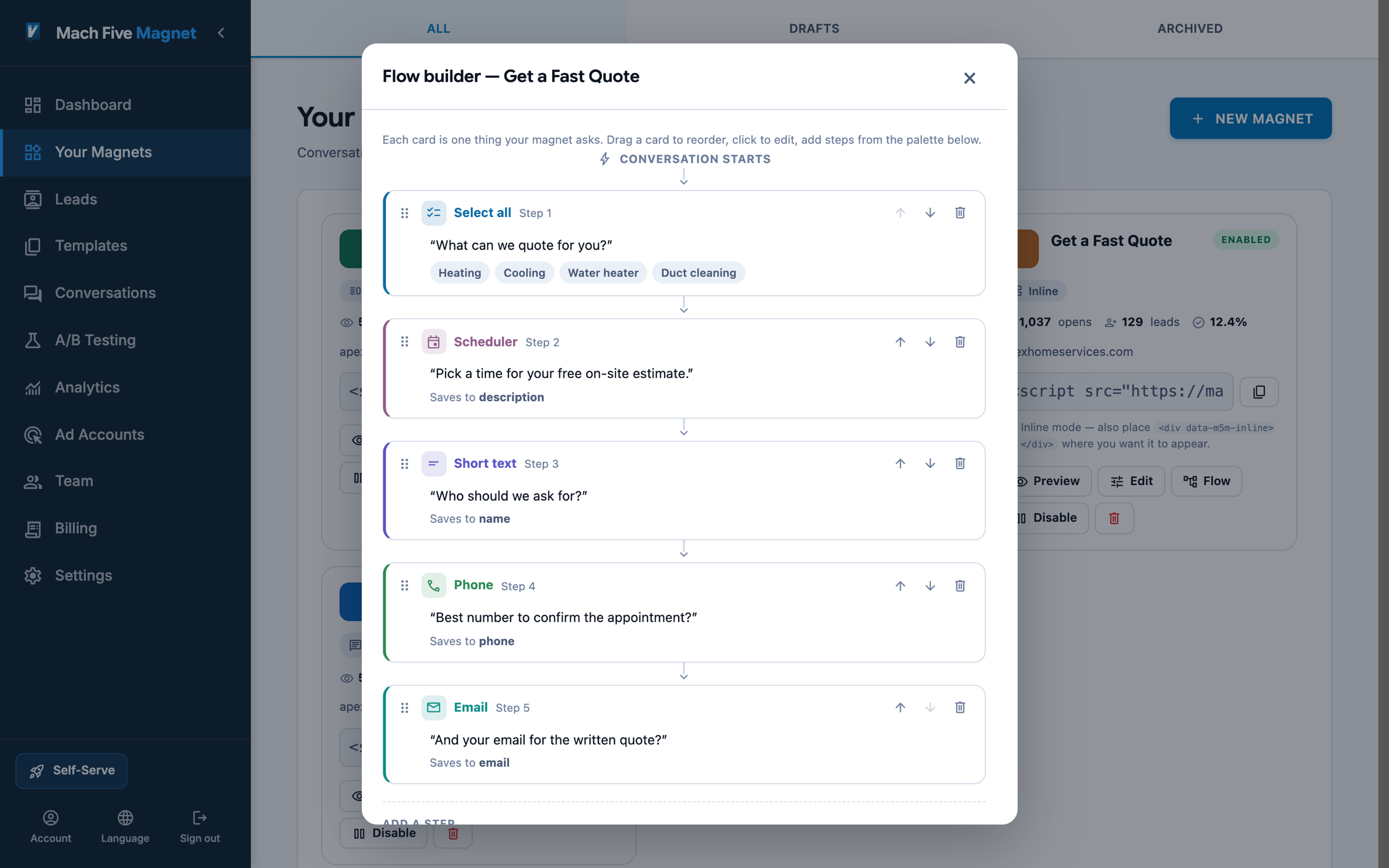 The Mach Five Magnet visual flow builder. Map your conversation logic on a canvas.
Sketch your flow before building it. The best conversational flows follow a natural progression:
- Opening: Friendly greeting that sets expectations (“Let’s find the right fit. It takes about 60 seconds.”)
- Qualifying Questions: 2-3 questions that segment the visitor (industry, company size, primary challenge)
- Deepening Questions: Based on their segment, ask relevant follow-up questions
- Value Exchange: Offer something specific based on their answers (custom recommendation, relevant case study, tailored demo)
- Contact Capture: Ask for name, email, and any critical contact info
- Confirmation: Clear next steps and set expectations
The key insight: capture contact information after you’ve provided value, not before. By the time visitors reach the contact fields, they’ve already received personalized guidance and are motivated to complete the exchange.
Step 3: Write Conversational Copy
The tone of your flow matters as much as the structure. Guidelines:
- Use first and second person: “What brings you here today?” not “Please indicate your primary interest”
- Keep questions short: Under 20 words per question
- Acknowledge responses: “Got it, that helps us help you” between questions, so it reads like a conversation instead of an interrogation
- Be specific with options: “SaaS / E-commerce / Professional Services / Other” not “Select your industry”
- Match your brand voice: If your brand is casual, your flow should be too
Step 4: Design Conditional Branches
Conditional logic is what separates conversational flows from simple multi-step forms. Based on visitor responses, your flow should adapt:
- Industry = SaaS: Show SaaS-specific pain points and case studies
- Company size = Enterprise: Route to enterprise demo scheduling
- Company size = Startup: Offer self-serve trial
- Primary challenge = Lead generation: Highlight lead gen capabilities
- Primary challenge = Analytics: Focus on measurement and reporting
Each branch should feel natural, like a knowledgeable salesperson adjusting their pitch based on what they’re hearing.
Step 5: Choose Your Display Format
Conversational flows can be deployed in multiple formats, each suited to different contexts:
- Chat Bubble: A floating icon (usually bottom-right) that expands into a conversation. Best for passive engagement, available without being intrusive
- Embedded: Placed inline within page content. Best for landing pages where the flow IS the primary CTA
- Pop-up Modal: Center-screen overlay triggered by an event. Best for exit intent or time-delayed engagement
- Slide-out Panel: A drawer that slides in from the side. Best for content-heavy pages where you don’t want to obscure the content entirely
The format should match the visitor’s context. A blog reader encountering a chat bubble feels natural. The same reader hit with a pop-up modal while reading feels disruptive.
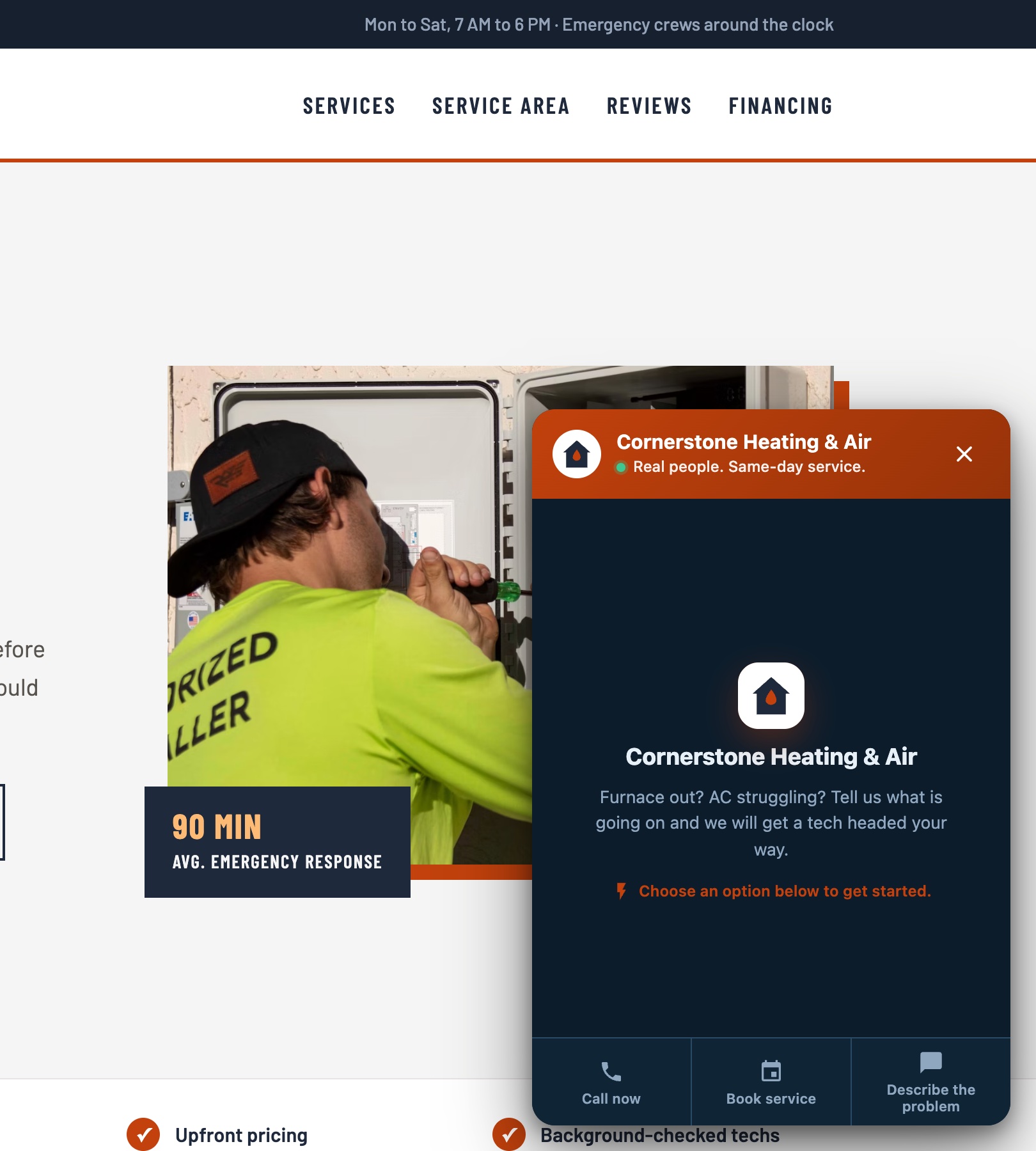
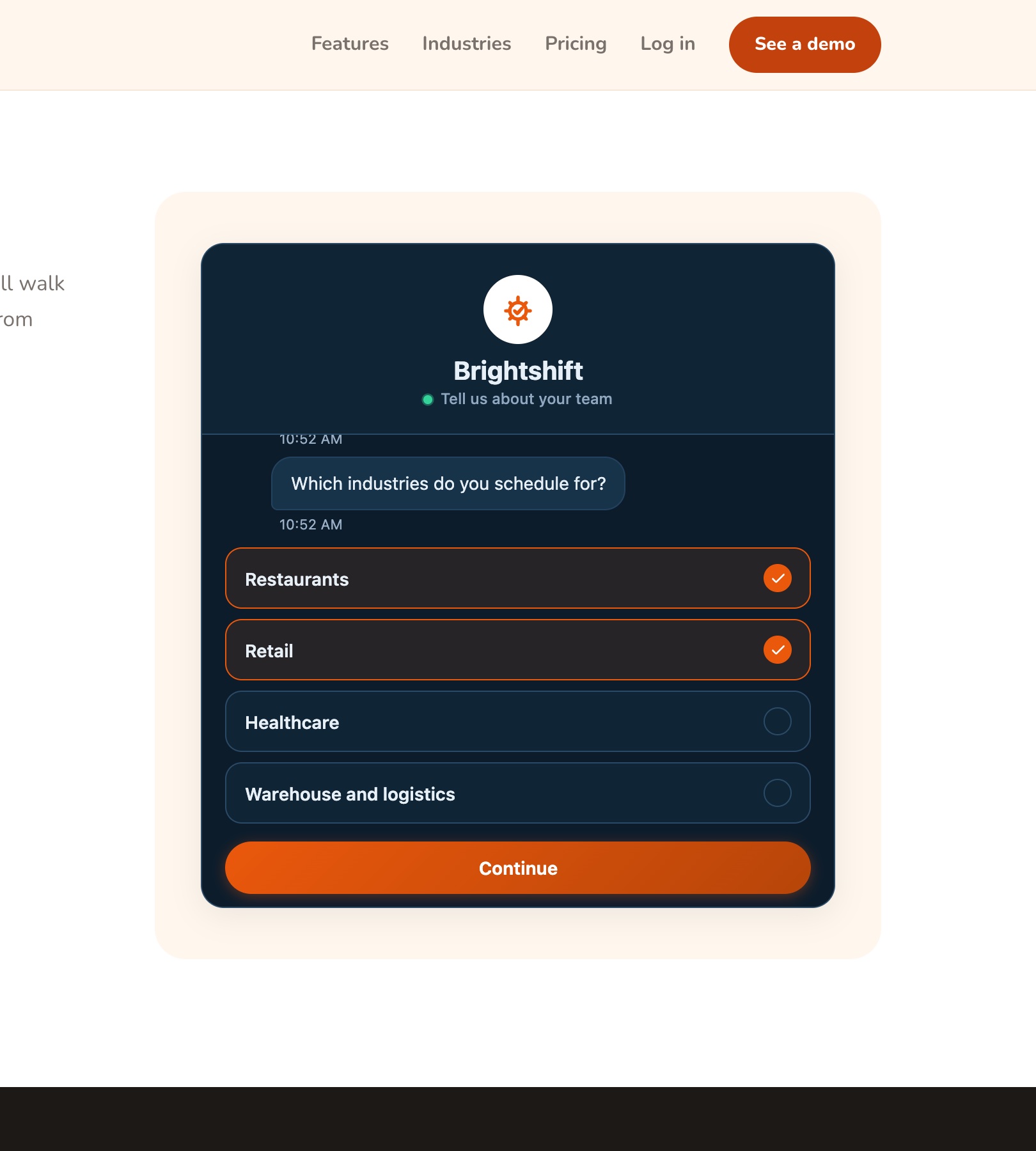
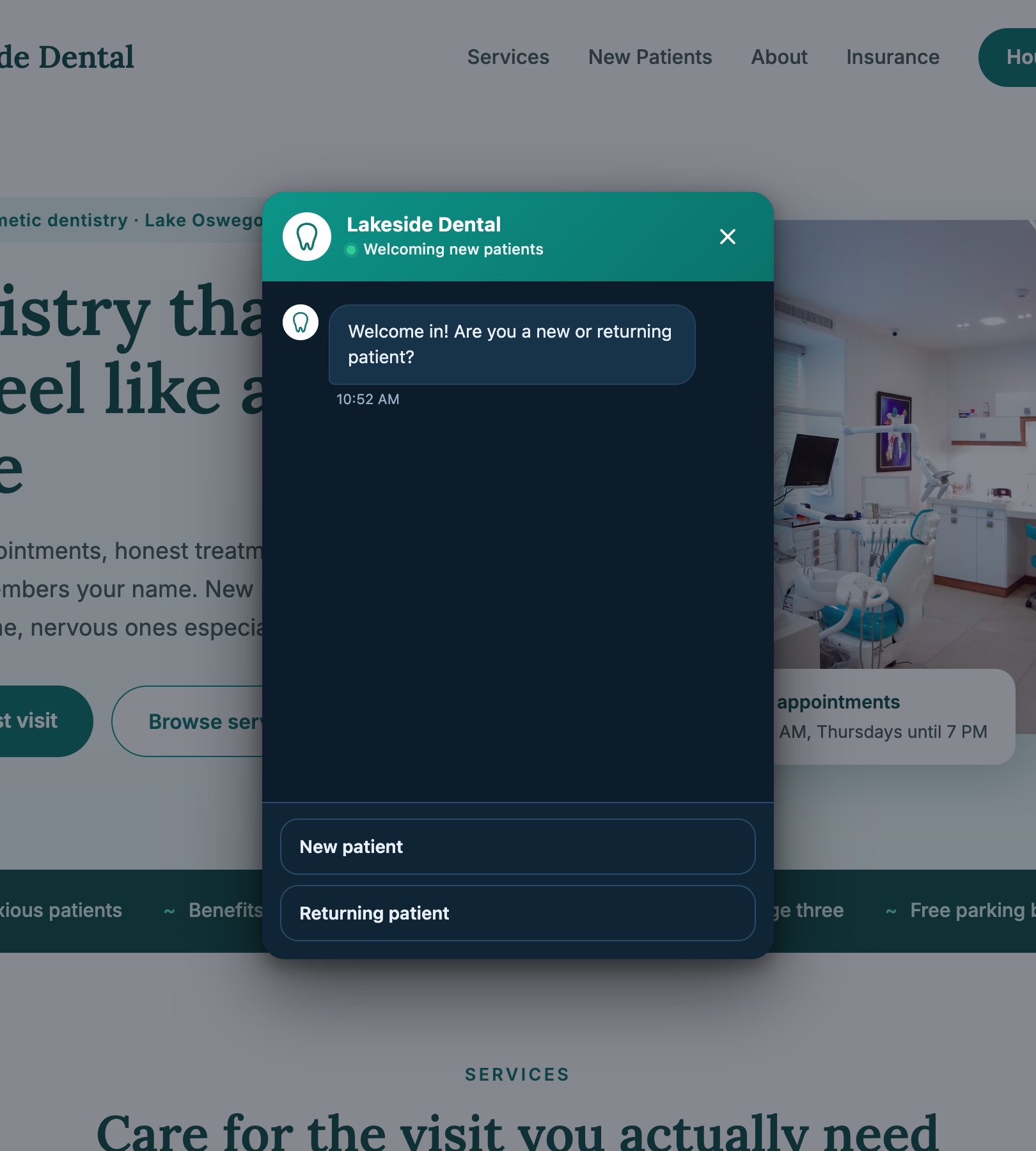
One more piece worth planning for: not everyone wants the conversation. Some customers already know they want to call, book, or email. Mach Five Magnet handles this with the welcome hub, an opening screen with opt-in buttons for Book, Call, or Email alongside the conversation, so every kind of visitor gets a path that fits.
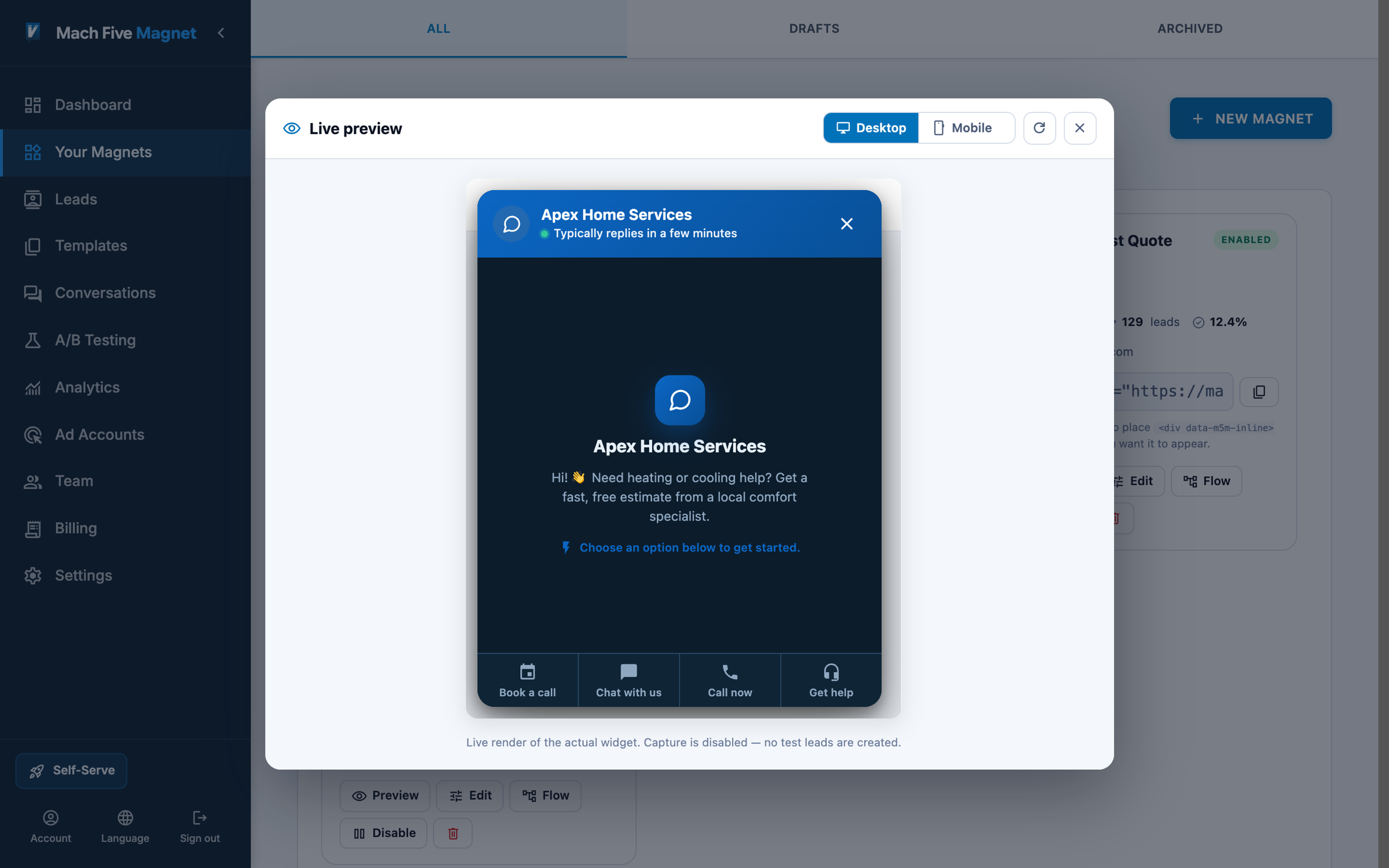 The welcome hub. Direct channels for people who know what they want, a conversation for everyone else.
Step 6: Configure Triggers
When and how your flow appears dramatically affects engagement:
- Time Delay: Show after 15-30 seconds on page (visitor has demonstrated interest)
- Scroll Depth: Trigger at 50-60% scroll (visitor has consumed meaningful content)
- Exit Intent: Detect cursor moving toward browser close (last-chance engagement)
- Click Event: Attach to a specific CTA button (highest intent)
- Page Load: Immediately visible (best for dedicated landing pages)
Combining triggers with page context creates smart engagement. For example: show a chat bubble after 20 seconds on a pricing page (high-intent signal), but wait for exit intent on a blog post (lower intent, don’t interrupt reading).
Advanced Optimization Techniques
A/B Testing Your Flows
The most impactful elements to test:
- Opening message: The first impression determines whether visitors engage or dismiss
- Number of steps: Shorter isn’t always better. The right length depends on your audience and offer
- Question order: Leading with easy questions vs. leading with qualifying questions
- Display format: Chat bubble vs. embedded vs. slide-out for the same audience
- Trigger timing: 10 seconds vs. 30 seconds vs. scroll-based
When testing, change one variable at a time and let the test run until you reach statistical significance. Calling a winner early on a handful of completions is how teams end up shipping the worse variant.
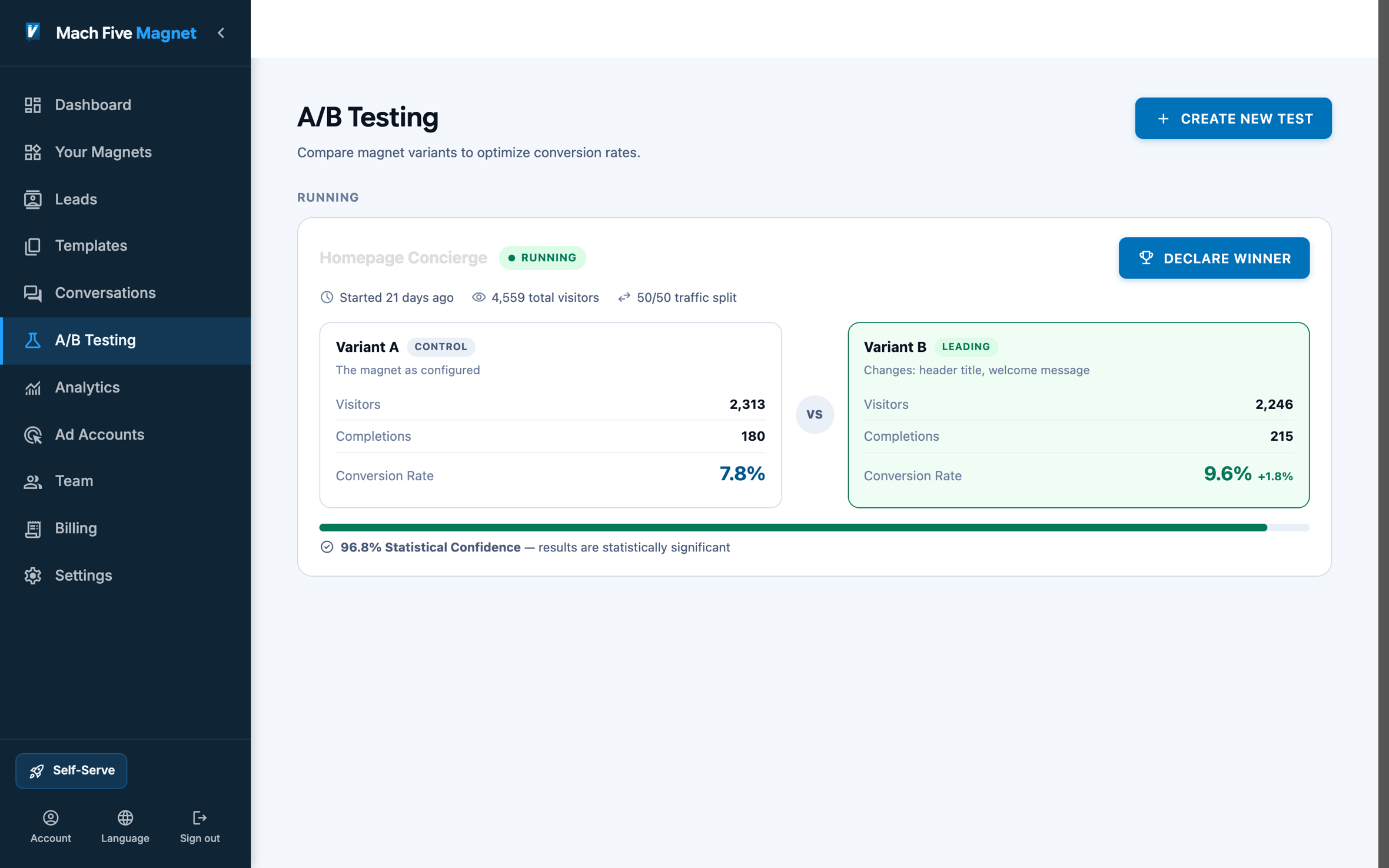 A/B testing in Mach Five Magnet. Two versions against live traffic, and the winner stays.
Everything covered so far, the flow builder, the formats, the testing, lives in one product. If you would rather see it than read about it, the Mach Five Magnet page shows each piece with live example builds.
Optimizing for Conversion Rate
Beyond A/B testing, these strategies consistently improve conversational flow performance:
Reduce perceived length: Show a progress indicator (“Step 2 of 4”) so visitors know how much is left. Uncertainty about length causes abandonment.
Validate in real-time: Don’t let visitors reach the end only to discover they entered an invalid email. Validate immediately and provide helpful correction.
Offer escape hatches: Include a “Skip” option for non-essential questions. Forcing answers to every question increases abandonment more than incomplete data hurts lead quality.
Use typing indicators: A brief “typing” animation before showing the next question mimics human conversation pacing and increases engagement. Instant responses feel robotic.
Personalize dynamically: Use earlier answers to customize later questions. “Since you’re in SaaS, what’s your primary growth challenge?” feels more relevant than generic follow-ups.
Analyzing Flow Performance
Key metrics to monitor:
- Start Rate: % of visitors who begin the flow (indicates trigger and opening effectiveness)
- Step-by-Step Drop-off: Where visitors abandon (indicates problematic questions)
- Completion Rate: % who reach the final step (overall flow health)
- Lead Quality Score: How well flow-captured leads convert downstream
- Time to Complete: Average flow duration (too fast = insufficient qualification, too slow = friction)
The step-by-step drop-off analysis is particularly valuable. If 80% of visitors answer question 1 but only 40% answer question 2, that second question needs work. It’s either too personal, too complex, or irrelevant.
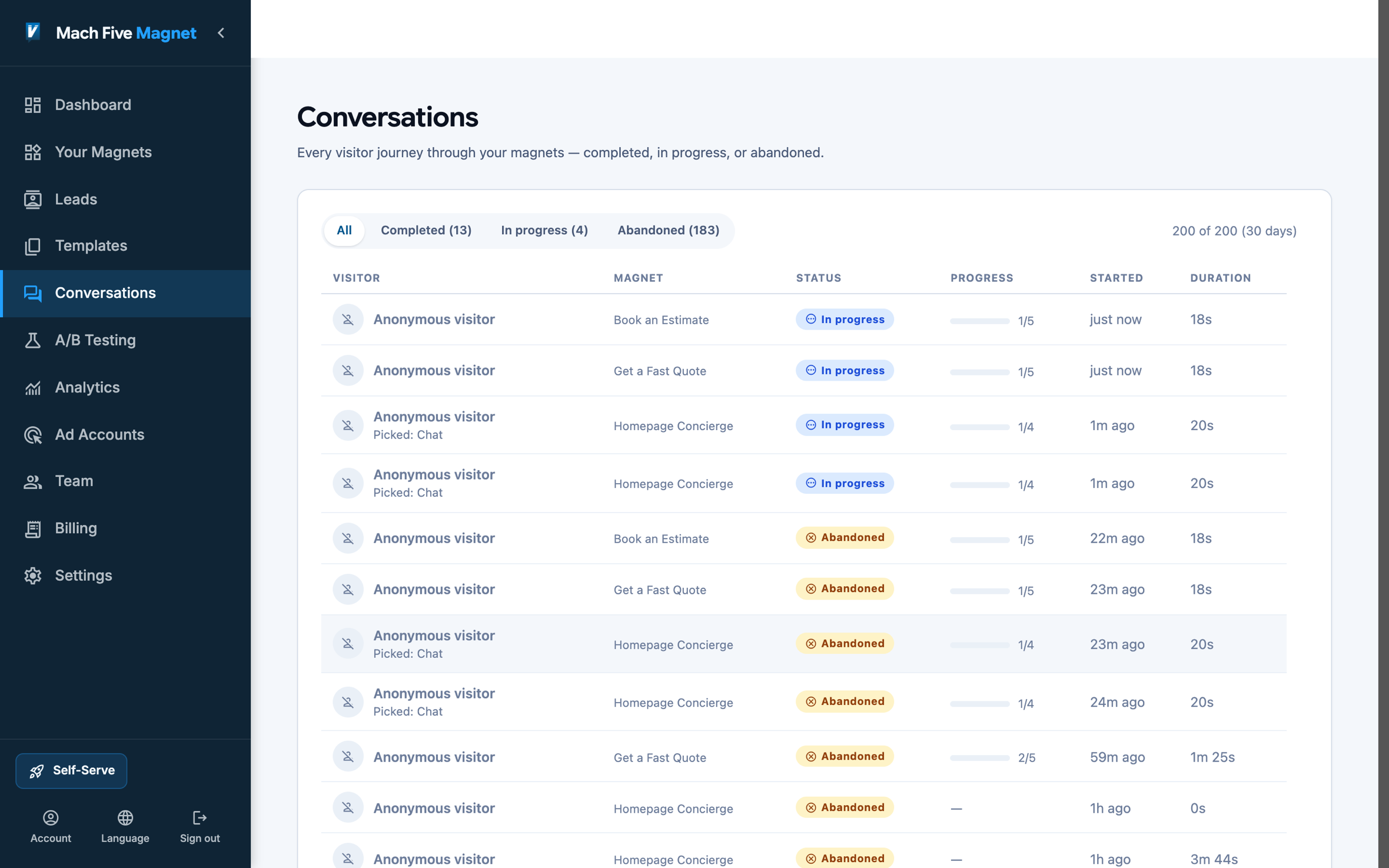 Journeys and funnel analytics. See where conversations stall and which steps convert.
Industry-Specific Implementation
B2B SaaS
Flow structure: Product interest → Company size → Current tools → Primary pain point → Demo booking
Key insight: B2B buyers want to self-qualify before talking to sales. Use conditional logic to route enterprise prospects to sales while offering self-serve trials to smaller companies. This respects the buyer’s journey and improves sales team efficiency.
Recommended trigger: Time delay (20s) on pricing page, scroll depth (60%) on feature pages
E-Commerce
Flow structure: Product category interest → Budget range → Style preferences → Email capture → Personalized recommendations
Key insight: Product recommendation flows have the highest engagement rates in e-commerce. Visitors actively want help narrowing choices. Frame it as a “personal shopping assistant.”
Recommended trigger: Chat bubble on category pages, embedded flow on landing pages
Professional Services
Flow structure: Service need → Project timeline → Budget range → Company details → Consultation booking
Key insight: Trust is the primary barrier. Include social proof elements (client count, satisfaction ratings) within the flow itself, not just on the surrounding page.
Recommended trigger: Exit intent on service pages, click-triggered from CTAs
B2B Lead Generation
Flow structure: Challenge identification → Solution interest → Decision timeline → Contact details → Resource delivery
Key insight: The value exchange must feel proportional. Asking for an email to download a whitepaper is fine. Asking for phone number, company, role, and budget for the same whitepaper feels extractive. Save deeper qualification for higher-value offers.
Recommended trigger: Scroll depth (50%) on content pages, time delay (15s) on solution pages
Common Mistakes to Avoid
Asking Too Many Questions
The optimal flow length is 4-7 steps for most use cases. Every additional question beyond the minimum needed costs you completions. Ask yourself: “Would I answer this question from a stranger?” If not, remove it.
Ignoring Mobile Experience
If your flow works on desktop but hasn’t been tested on mobile, you’re losing the majority of your audience. Test on actual devices, not just responsive browser windows.
Poor Timing
Showing a pop-up flow immediately when someone lands on your site is the digital equivalent of a salesperson ambushing you at the store entrance. Give visitors time to understand your value before asking for engagement.
No Clear Value Proposition
“Fill out this form” is not a value proposition. “Let’s find the right solution for you in 60 seconds” is. Every flow needs to clearly communicate what the visitor gets in exchange for their time and information.
Treating All Visitors the Same
A first-time blog reader and a returning pricing page visitor have fundamentally different intents. Use page context, visit history, and referral source to show different flows to different visitor segments.
Measuring ROI
To calculate the return on investment of conversational lead capture:
Direct metrics:
- Increase in lead volume (compare to previous static form performance)
- Improvement in lead quality (measure downstream conversion rates)
- Reduction in cost per lead (same traffic, more conversions = lower CPL)
Indirect metrics:
- Reduction in sales team time spent on unqualified leads
- Improvement in visitor engagement metrics (time on site, pages per session)
- Increase in return visitor rate (positive experiences drive return visits)
Judge the flow the way you would judge any channel: cost per lead on the same traffic, before and after. That is the number that decides whether it stays.
Getting Started with Mach Five Magnet
Mach Five Magnet is our conversational lead capture software. It implements everything covered in this guide without code: build the conversation in a visual flow builder, deploy it in any of four formats (chat bubble, inline embed, pop-up, or slide-out panel), and work the results in one lead inbox.
Key capabilities:
- The visual flow builder: build flows by connecting conversation nodes on a canvas
- Conditional logic: create branching paths based on your visitor’s responses
- The welcome hub: opt-in Book, Call, and Email buttons alongside the conversation
- Four display formats: one magnet, four ways onto the page
- The lead inbox: every finished conversation lands as a lead you can work, mark, and export
- Journeys and funnel analytics: see where conversations stall and which steps convert
- A/B testing: run two versions against live traffic and keep the winner
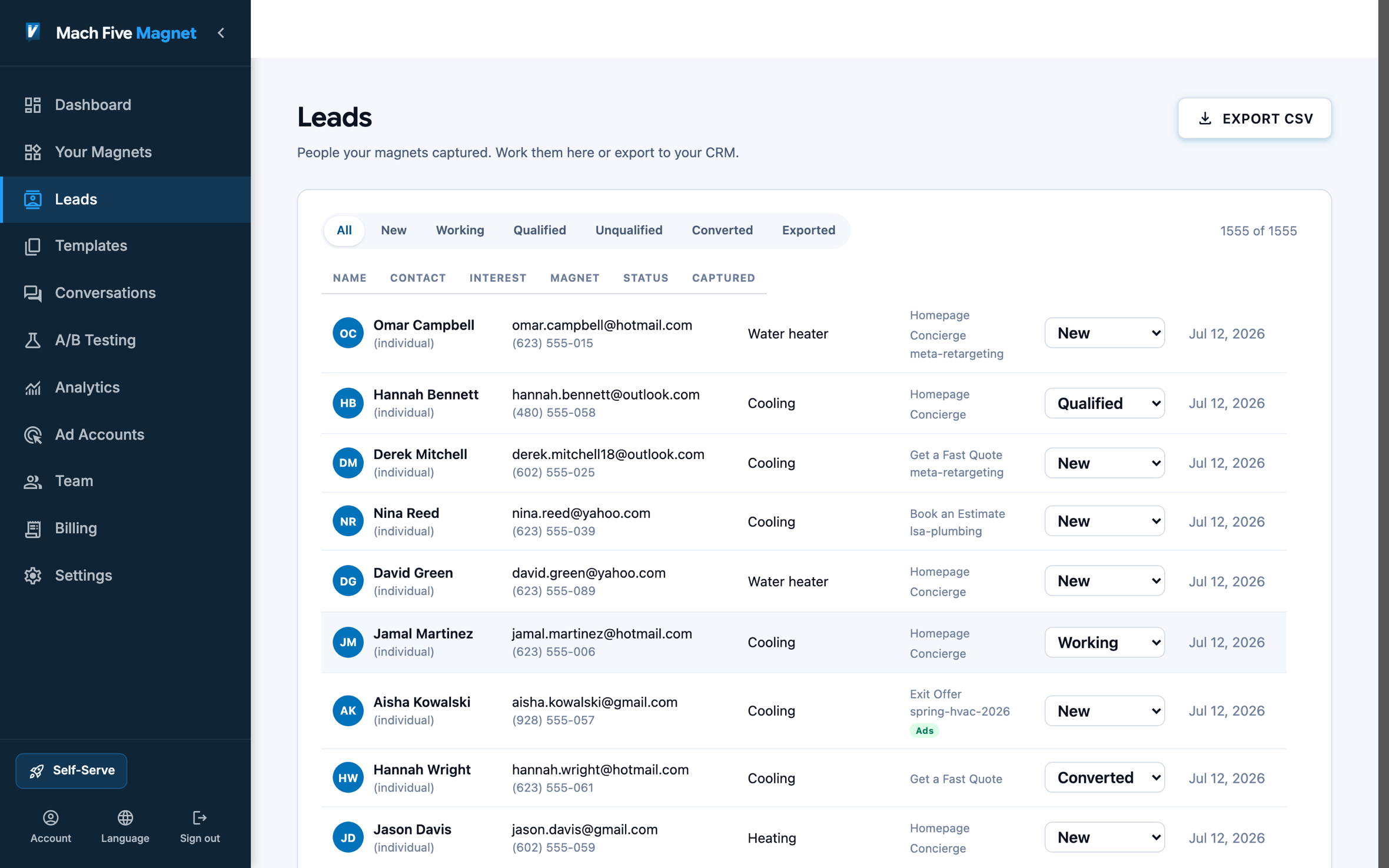 The lead inbox. Name, need, time, number, and the ad that brought them.
See live example builds on the product page, start free at machfivemagnet.com, or contact us to have our team run it for you.
Frequently Asked Questions
How long should a conversational flow be?
4-7 steps is optimal for most use cases. Lead qualification flows can be shorter (3-4 steps), while product recommendation flows can be longer (6-8 steps) because visitors are actively seeking guidance. Test different lengths with your specific audience.
Do conversational flows work for B2B?
Exceptionally well. B2B buyers prefer self-service experiences early in the buying journey. Conversational flows let them self-qualify and get relevant information without committing to a sales call. This actually increases the quality of leads that do reach sales.
What conversion rate should I expect?
Benchmark your current form’s completion rate first, then measure the flow against it on the same traffic. Results depend on your offer, audience, and flow quality, so judge against your own baseline rather than industry folklore. The research evidence points the right direction: in field experiments with more than 16,000 participants, conversational capture produced more leads, of higher quality, than static pages (Journal of Business Research, 2025).
Can I use conversational flows alongside existing forms?
Yes. Many teams run conversational flows and static forms simultaneously, using different triggers for each. For example, keep your existing contact form for visitors who actively seek it out, while deploying a conversational flow triggered by scroll depth for passive visitors.
How do I handle data privacy and GDPR?
Conversational flows should include the same privacy disclosures as static forms. Include a consent checkbox before collecting personal information, link to your privacy policy, and ensure collected data is stored and processed in compliance with applicable regulations.
What’s the difference between conversational flows and chatbots?
Conversational flows follow pre-designed paths with conditional logic. You control every possible interaction. Chatbots use AI/NLP to handle freeform questions, which requires more setup, ongoing training, and can produce unpredictable responses. Flows are simpler, more predictable, and easier to optimize.
How quickly can I deploy a conversational flow?
With a visual builder like Mach Five Magnet, you can build and deploy a basic flow in under an hour. More complex flows with multiple branches take longer to write and test, and the writing is where the value is. The installation itself is a single script tag added to your site.
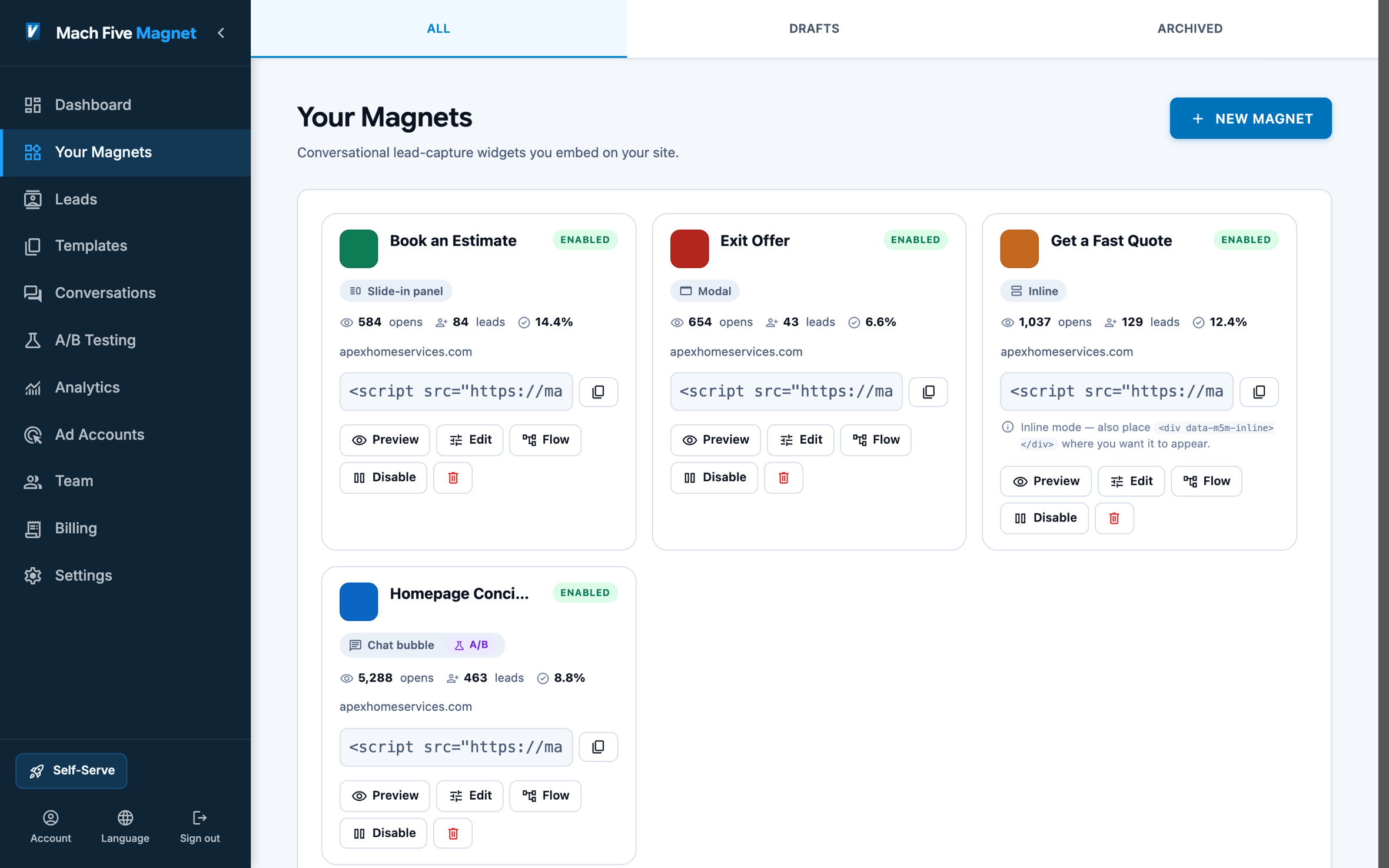 One-line install. A single script tag serves the magnet on any site.
Should I replace all my forms with conversational flows?
Not necessarily. Simple forms (newsletter signup, basic contact) may perform fine as-is. Conversational flows have the biggest impact where static forms have high abandonment: lead qualification, demo requests, product recommendations, and any form with more than 3-4 fields.